
Current release · Windows 11 and Windows 10
Download Free WiFi Hotspot 8.1.0
Turn a compatible Windows PC into a Wi-Fi hotspot and share an existing internet connection with phones, tablets and other devices.
Download Free WiFi Hotspot 8.1.0
2.42 MB · Direct HTTPS download · No account required
Before you install
- Supported systems: Windows 11 and Windows 10.
- Hardware: A working Wi-Fi adapter that supports hotspot or hosted-network functionality.
- Connection: An internet source such as Ethernet, Wi-Fi or a supported mobile connection.
- Permission: Windows may request administrator approval during installation and network configuration.
Download only from this website. Compare the SHA-256 below if you want to confirm the 8.1.0 file.
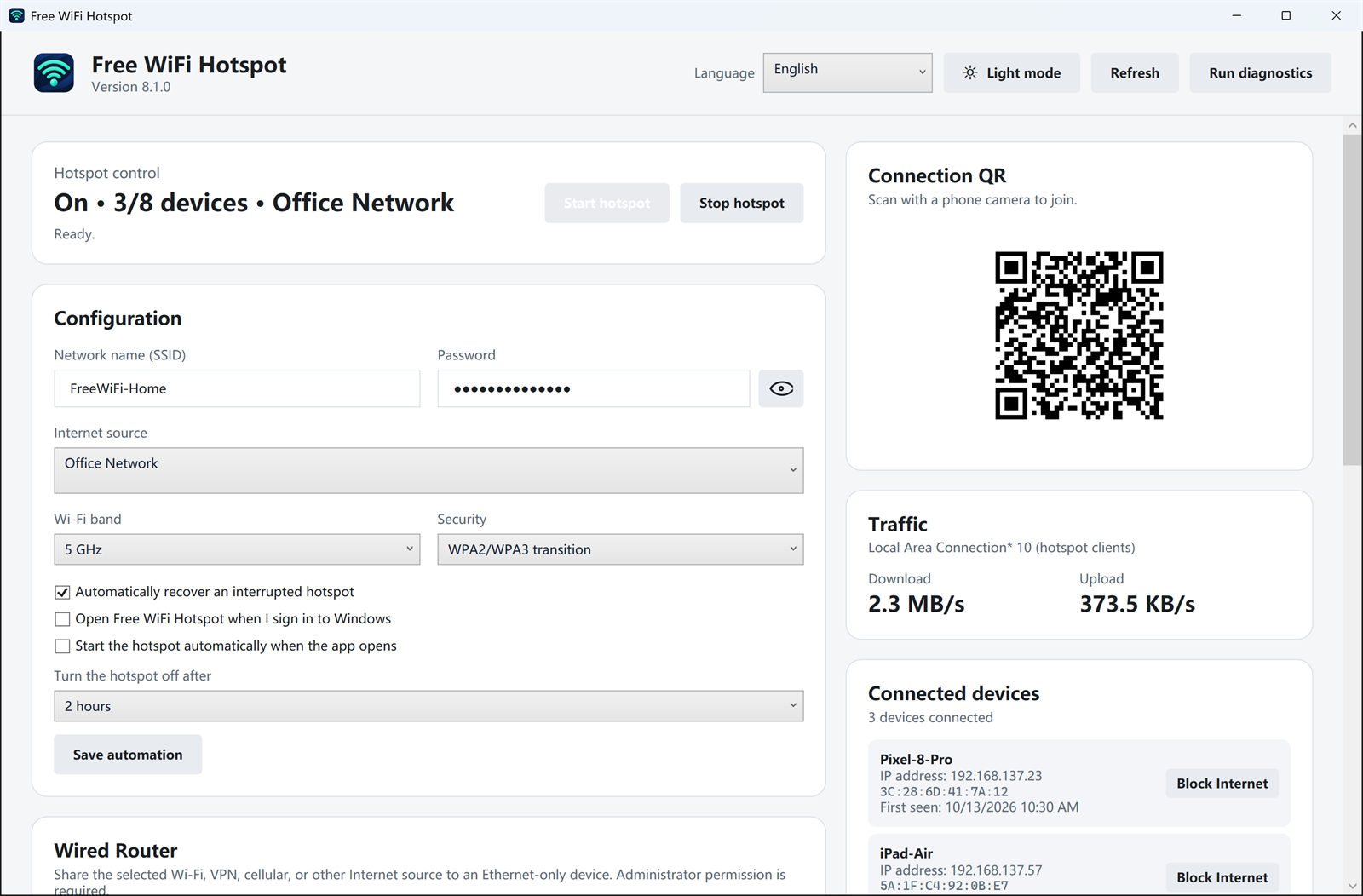
How to create a hotspot after installation
- Open Free WiFi Hotspot. Allow the requested Windows network permission.
- Select the internet connection to share. Confirm that the connection works on the PC before sharing it.
- Set the network name and password. Use a unique password rather than reusing your router, email or Microsoft account password.
- Start the hotspot. On the other device, open Wi-Fi settings, choose the new network and enter the password.
- Test and stop when finished. Confirm browsing works, then turn off the hotspot when you no longer need it.
For screenshots and additional setup detail, use the Windows 11/10 setup guide.
Hotspot will not start?
Check the Wi-Fi adapter, driver, Windows sharing settings and conflicting VPN or firewall software.
Connected but no internet?
Verify the PC itself is online, then reselect the source connection and restart the hotspot.
Sharing public Wi-Fi?
Follow the network provider’s terms. A hotspot does not make an untrusted upstream network private.
Download verification
File: FreeWiFiHotspot.exe
Size: 2,539,736 bytes
SHA-256:
00DFE2C274F11D7B2A7D5683A0A6F707DB1C8AA9FCC8F229412F6E65B7CB8F82
Frequently asked questions
Does Free WiFi Hotspot work on Windows 11?
Yes. Version 8.1.0 supports Windows 11 and Windows 10. Hotspot availability also depends on the Wi-Fi adapter and its driver.
Why can another device connect but not browse?
The source connection may not be shared correctly, a VPN may be intercepting traffic, or Windows Firewall/network services may need to be restarted. Confirm the PC can browse first and follow the troubleshooting guide.
Does creating a hotspot bypass hotel or airline limits?
No. Use the service only where connection sharing is allowed. Authentication, device limits and provider terms still apply.
Is the installer signed?
Yes. Version 8.1.0 is digitally signed.
Ready to share your connection?
Download version 8.1.0 for Windows 11 or Windows 10.