
Short answer: the best hotspot “app” for most people is already built into the phone. Use Personal Hotspot on iPhone or Hotspot & tethering on Android first. Third-party apps can help with a few advanced Android-to-PC or Wi-Fi repeater situations, but they do not create free internet and they should not be used to evade carrier limits.
Last reviewed: August 20, 2026. We checked the current Apple, Google, Microsoft and app-developer instructions before updating this guide.
Best WiFi hotspot options at a glance
| Option | Best for | Connection methods | What to know |
|---|---|---|---|
| Apple Personal Hotspot | Most iPhone users | Wi-Fi, Bluetooth or USB | Built into iOS; shares the iPhone’s cellular connection |
| Android Hotspot & tethering | Most Android users | Wi-Fi, Bluetooth or USB | Built in; menus vary by phone maker and Android version |
| PdaNet+ | Advanced Android-to-PC fallback | Wi-Fi Direct, USB or Bluetooth | Requires companion software for some modes; check carrier terms |
| NetShare | Advanced Android Wi-Fi sharing or repeater use | Wi-Fi Direct/proxy-style setup | Client setup is less simple than a normal hotspot; Android 6+ per its listing |
| Windows Mobile Hotspot | Sharing from a Windows 11/10 PC | Wi-Fi or Bluetooth | Built into Windows; can share Wi-Fi, Ethernet or cellular |
1. Apple Personal Hotspot: best choice for iPhone
For an iPhone, start with Apple’s built-in Personal Hotspot instead of searching for an unofficial hotspot app. It is integrated with iOS, supports Wi-Fi, Bluetooth and USB connections, and does not require a separate app download.
How to turn on Personal Hotspot
- Open Settings.
- Tap Personal Hotspot. If it is not shown, open Cellular first.
- Turn on Allow Others to Join.
- Review the Wi-Fi password shown on the screen.
- On the other device, select the iPhone from the Wi-Fi list and enter that password.
Apple states that Personal Hotspot shares the iPhone’s cellular internet connection. An iPhone connected to another Wi-Fi network cannot simply rebroadcast that Wi-Fi network through Personal Hotspot. Carrier support and charges may also apply.
If a Windows PC connects by USB, Apple says the PC needs Apple Devices or iTunes installed. For current setup details, use the official Apple Personal Hotspot guide. If the setting is missing or devices cannot connect, follow Apple’s Personal Hotspot troubleshooting steps before installing third-party software.
2. Android Hotspot & tethering: best choice for most Android phones
Most current Android phones can share mobile data using a Wi-Fi hotspot, Bluetooth tethering or USB tethering. Some models can also share an existing Wi-Fi connection, but that capability depends on the phone maker and software version.
How to start an Android Wi-Fi hotspot
- Swipe down from the top of the screen.
- Touch and hold Hotspot. If the tile is hidden, edit Quick Settings and add it.
- Open Wi-Fi hotspot and set a recognizable network name and a strong password.
- Turn the hotspot on.
- On the receiving device, choose that network and enter the password.
The exact labels may be Network & internet > Hotspot & tethering, Connections > Mobile Hotspot and Tethering, or something similar. Google notes that some carriers limit tethering or charge extra, so confirm your plan first. See the official Android tethering guide for current instructions.
Which Android tethering method should you use?
- Wi-Fi hotspot: easiest for connecting several nearby devices, but usually uses more battery.
- USB tethering: a stable choice for one computer and can charge the phone at the same time.
- Bluetooth tethering: can use less power, but it is normally slower than Wi-Fi or USB.
3. PdaNet+: an advanced Android-to-PC fallback
PdaNet+ is worth considering only when the built-in Android tethering modes do not fit your setup. Its developer offers Wi-Fi Direct, USB and Bluetooth modes, with companion desktop software required for some connections. The free edition may interrupt a session and require reconnection.
Download it only from the official PdaNet website or the official app store linked there. Do not use tethering software to hide usage, bypass a carrier block or avoid plan charges. Those actions can violate service terms and can lead to unexpected bills or account restrictions.
NetShare is designed for Android users who need a Wi-Fi Direct/proxy-style sharing setup or a repeater-like function. Its current Google Play listing says it requires Android 6 or later. It can be useful when a normal Android hotspot does not offer the desired network-sharing behavior, but connecting client devices may require extra proxy or companion-app configuration.
Use the official NetShare Google Play listing, review its current privacy and subscription information, and stay within your carrier and network-provider rules. For most people, the phone’s built-in hotspot remains simpler.
If your computer already has a working Wi-Fi, Ethernet or cellular connection, Windows 11 and Windows 10 can share it through the built-in Mobile hotspot feature. Open Settings > Network & internet > Mobile hotspot, choose the connection to share, select Wi-Fi or Bluetooth, edit the network name and password, and turn the feature on. Microsoft’s current steps are available in the official Windows Mobile Hotspot guide.
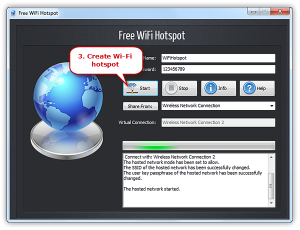
For users who prefer a dedicated interface, Free WiFi Hotspot 8.0.0 supports Windows 11 and Windows 10 and provides a guided way to name the network, set a password and start sharing. It is intended for sharing a connection you are authorized to use.
Download Free WiFi Hotspot for Windows 11/10
If Windows reports that Mobile Hotspot is unavailable, work through our Windows 11 Mobile Hotspot troubleshooting guide. You can also compare the best hotspot software for Windows or follow the illustrated guide to create a Wi-Fi hotspot.
How to choose the right hotspot option
Use this order to avoid unnecessary apps and risky downloads:
- Try the built-in feature first. It receives operating-system security updates and requires no extra account.
- Check the connection you are sharing. A phone hotspot normally uses mobile data; a Windows hotspot can share Wi-Fi, Ethernet or cellular.
- Check carrier and network rules. “Unlimited” phone plans may still apply separate hotspot limits.
- Choose the simplest connection method. Wi-Fi is convenient, USB is stable for one computer, and Bluetooth is useful when speed is not the priority.
- Install third-party tools only from their official source. Avoid old APK archives, jailbreak repositories and download mirrors.
Hotspot security checklist
- Use WPA2 or WPA3 when the device offers it.
- Create a long, unique password; do not leave the default password visible in public.
- Check the connected-device list and remove devices you do not recognize.
- Turn the hotspot off when the session is finished.
- Watch mobile-data use, especially during Windows updates, cloud backups and video streaming.
- Do not share a workplace, hotel or school connection unless its rules allow it.
Frequently asked questions
Do free hotspot apps provide free internet?
No. A hotspot app shares an existing cellular, Wi-Fi or wired connection. The connection may still use paid mobile data or be subject to the network provider’s limits.
What is the best WiFi hotspot app for iPhone?
For most iPhone users, Apple Personal Hotspot is the best option because it is built into iOS and supports Wi-Fi, Bluetooth and USB. If it is missing, check carrier support and Apple’s troubleshooting guide.
Can an iPhone repeat a Wi-Fi network?
Not through Personal Hotspot. Apple documents Personal Hotspot as sharing the iPhone’s cellular connection, not rebroadcasting the Wi-Fi network to which the iPhone is connected.
What is the best hotspot app for Android?
Start with Android’s built-in Hotspot & tethering feature. PdaNet+ or NetShare may help with specific advanced setups, but they add configuration and should be used only within carrier and network terms.
Why is the hotspot option missing from my phone?
The phone model, operating-system version, carrier settings or mobile plan can affect availability. Restart the phone, install official system and carrier updates, verify mobile data, and contact the carrier if the menu is still absent.
Is a phone hotspot or a Windows hotspot better?
A phone hotspot is quickest when mobile data is the available connection. A Windows hotspot is more useful when the PC already has Ethernet or Wi-Fi and you want the computer to control sharing. Choose the device with the most stable authorized internet connection.
Get Free WiFi Hotspot 8.0.0 for Windows 11/10 →